
Editing Real Estate Photos With AI: Upgrade Basic Property Photos Without Hiring a Photographer

Updated: Feb 13
How to Turn Basic Listing Photos Into Professional Real Estate Images With AI
Once you upload a property photo into an AI image generation tool, you can enhance it in a few specific ways.
Improve lighting and shadows so the room feels brighter and more open.
Correct color tones so white walls do not look yellow or blue.
Sharpen details so finishes and textures look clean.
Enhance windows so exterior light does not look blown out.
Generate alternate versions, such as twilight photography or brighter lifestyle styled edits.
AI real estate photography allows you to transform an average property photo into a marketing ready image without scheduling another shoot.
It is not about creating something fake. It is about improving what is already there.

Editing Real Estate Photos To Look Professional.
AI image generation works best when the base image has good composition but poor execution.
Here are the types of property photos that respond extremely well to AI enhancement.
Interior Photos With Flat Lighting
Most phone cameras struggle indoors.
Rooms look darker than they feel in person.
Shadows look heavy.
White walls look dull.
AI real estate photo editing can brighten shadows, balance window exposure, and correct color temperature so the space feels open and clean.
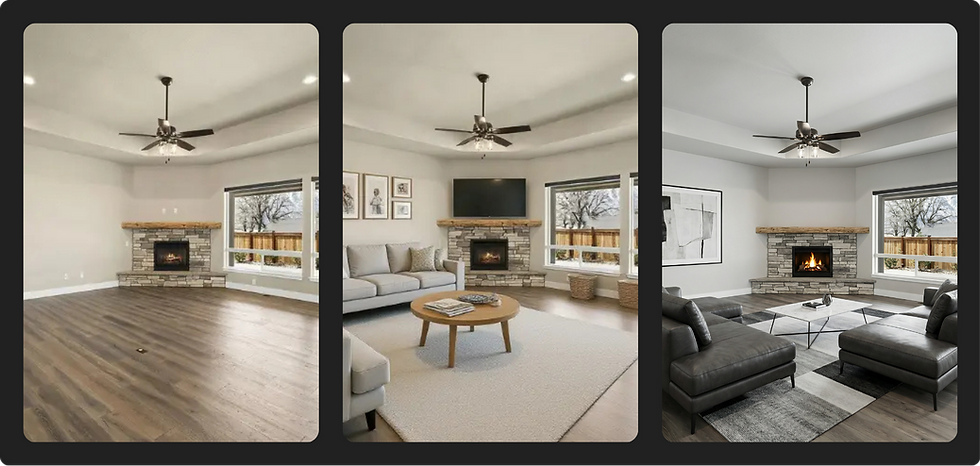
Overcast Exterior Shots
Gray sky days are common, especially in certain markets.
AI can enhance contrast, improve sky tone, and create brighter daylight versions. In some cases, you can generate twilight-style edits that feel high-end and dramatic.
Slightly Underexposed Kitchen and Living Areas
Kitchens sell homes.
But kitchen photos often look darker than reality. AI can:
Improve brightness
Enhance cabinetry detail
Clean up reflections
Balance stainless steel highlights
This makes finishes stand out without altering the structure of the home.

MLS Photos That Look Technically Correct but Emotionally Flat
Some listing photos are fine.
They are clear.
They are straight.
But they are boring.
AI real estate photography can adjust tone and depth to make images feel more premium and visually engaging for marketing.
Step-by-Step Workflow: How to Use AI to Upgrade Your Real Estate Photos
You do not need to be a designer.
You do not need editing software experience.
You do not need perfect photos.
You need a clean starting image and a clear goal.
Here is the simple process real estate agents can follow.
Start With the Best Version of Your Original Photo
Use:
Your phone photo
MLS image
Photographer’s raw version
Zillow listing image
Choose a photo with:
Straight framing
Clear focus
Good composition
Even if lighting is poor, that can be fixed.
Step 2: Improve Lighting and Color Balance
This is where AI real estate photography shines.
Enhance:
Brightness and exposure
Shadow detail
White balance
Contrast
The goal is not to over-edit.
The goal is to make the room feel how it felt in person.

Step 3: Remove Small Distractions
AI image generation tools can help with:
Minor clutter
Lens glare
Reflections
Small surface imperfections
MLS watermarks where permitted

Step 4: Generate Alternate Marketing Versions
Now you multiply your assets.
From one photo, you can generate:
Twilight exterior version
Brighter luxury tone version
High contrast social media version
Square crop for Instagram
Banner crop for email

This is where AI image generation turns one listing photo into five marketing assets.
Step 5: Export for Multiple Platforms
Once enhanced, use your upgraded property images for:
MLS
Social media
Email newsletters
Flyers
Listing presentations
You are no longer limited to one static version.
The New Standard for Real Estate Marketing
Real estate has always been visual.
Buyers scroll before they schedule.
They judge listings in seconds.
They compare homes side by side on their phones.
Your photos are no longer just documentation. They are marketing.
AI real estate photography gives agents something powerful:
Control.
You are no longer limited by bad lighting days.
You are no longer forced into expensive reshoots.
You are no longer stuck with one static version of a listing photo.
With AI image generation, you can:
Enhance what you already have
Multiply your marketing assets
Improve consistency across platforms
Move faster without sacrificing quality
This does not replace professional photographers for luxury listings or architectural work.
It fills the gap for everyday marketing needs.
It helps the solo agent compete with the team that has a bigger budget.
It turns average property photos into polished, professional marketing assets.
And in a market where attention is everything, that matters.


Comments